0
0
 0
0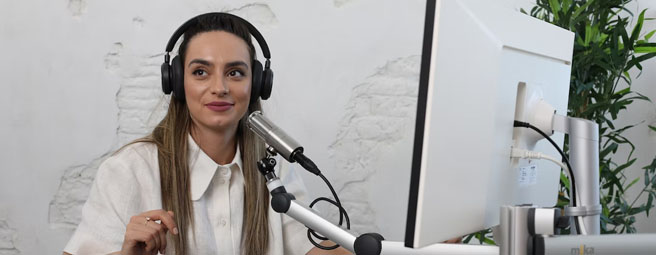
What Tech and Amenities Are Included in a Podcast Room Rental?
A business podcast recorded at a kitchen table usually sounds like one. The refrigerator hums in the background, the Wi-Fi drops halfway through a remote interview, and the video frame shows a cluttered bookshelf where a professional setting should be. Listeners pick up on those details, and more of them are paying attention than ever. Edison Research's Infinite Dial 2026 study found that 58% of Americans age 12 and older, roughly 167 million people, consumed a podcast in the last month, the highest share the study has recorded.
Renting a professional room solves many of these problems before you press record, but not every space is built for recording. Some rooms come with fast internet, quiet interiors, comfortable seating, and screens for remote guests, while others offer little more than a table and a few chairs. If you know which amenities to look for, you can book the right space the first time instead of discovering the gaps mid-episode.
This guide walks through the technology and room amenities that come with a podcast room rental and compares meeting rooms, day offices, and coworking spaces as recording locations. It also covers the equipment that completes your setup and the steps that make a podcast look and sound professional from the first episode. For a wider look at venue choice, see where to record a podcast for your business. If you are comparing rooms on more than recording quality, what meeting room rentals include is a useful companion checklist.
Key Takeaways
1. Reliable Internet Protects Every Take. Upload speed keeps remote guests connected and live streams stable. Ask about a wired backup connection before you book.
2. A Quiet Room Beats Expensive Gear. Hum and echo are harder to fix in editing than a weak microphone signal. Small rooms with soft surfaces record best.
3. Video Now Shapes the Room You Book. Weekly podcast fans are now as likely to watch episodes as to listen to audio alone. Lighting and backdrop matter as much as sound.
4. Meeting Rooms Work for Most Business Podcasts. A small meeting room with seating, table space, and power suits most interview formats. Day offices fit solo shows.
5. A Test Run Saves the Recording. Room tone and a sound check reveal hums, echo, and connection issues early. That gives you time to fix them before your guest arrives.
What Tech Amenities Are Included in a Podcast Room Rental?
Three technical amenities decide whether a recording session runs smoothly or stalls halfway through an interview. Before you compare furniture or décor, make sure the room offers a dependable internet connection, a quiet environment, and enough power for every device you plan to bring.
1. Internet Speed and Upload Reliability
Most people check download speed when they test a connection, but podcasters rely on upload speed. Upload bandwidth carries your audio and video to a remote guest, a live stream, or a cloud recording platform. When it is weak, you hear it as robotic audio, see it as frozen video, or lose the call entirely in the middle of an interview.
YouTube's live streaming guidance recommends running a speed test to check your upload bitrate before you go live, followed by a test stream that uses the same kind of audio and movement you plan to use in the real session. It is also worth asking whether the room has a wired ethernet port as a backup to Wi-Fi, since a cable connection holds steadier when many people share the same network. Every Davinci location includes high-speed wireless internet in its meeting rooms, so the connection is already in place when you arrive.
2. A Quiet Environment and Controlled Acoustics
Quiet is the one amenity you cannot add after the fact. Editing software can reduce some background noise, but it struggles with constant hum and echo, and heavy noise reduction tends to leave voices sounding thin and over-processed.
Smaller rooms are recommended because they produce less echo and pick up less background noise. It also favors surfaces that absorb sound, such as carpet, over tile, stone, glass, and brick. That is why a large conference room with glass walls can look impressive on camera and still sound hollow through a microphone.
When you reserve a room, ask for an interior space away from elevators, kitchens, break rooms, and street-facing windows. Discover how loudly the heating and air-conditioning system runs as well, because a steady vent hum carries straight into a sensitive microphone. If you are choosing between room types, a huddle room versus a conference room comparison helps you pick a smaller footprint that still fits the guest list.
3. Power Access for Every Device
A two-person video podcast can easily need power for two laptops, two cameras, a pair of LED lights, an audio interface, and a phone or two. Meeting rooms often place outlets along the walls or in floor boxes, so check where they sit in relation to the table before you start unpacking.
A surge-protected power strip and at least one extension cord cover most layouts, but confirm with the location that extension cords are allowed in the room. Run cables along the wall or under the table rather than across walkways, since a guest who catches a cord with a foot can pull a camera or microphone to the floor mid-episode. Fully charged camera batteries give you a backup if the nearest outlet turns out to be farther away than expected.
What Comfort Amenities Are Included in a Podcast Room for Hosts and Guests?
Comfort shows up in the audio. A host shifting in a stiff chair or a guest who arrived flustered after hunting for the right floor will both sound tense on the recording, which is why furniture and hospitality amenities deserve the same attention as the technology.
Seating and Table Space That Support Clean Audio
Chairs matter more than most podcasters expect. The Miami Dade College podcasting guide notes that microphones are sensitive enough to pick up small noises such as a chair moving, so a squeaky swivel or a rolling base can interrupt an otherwise clean take. Stable chairs without wheels are the safer choice, and it is worth testing each one for creaks before you start recording.
The table needs enough surface for microphones on stands, a laptop, printed notes, and water glasses without crowding anyone. Round and square tables work well for interviews because every speaker faces the others and sits at a similar distance from the microphone. A long boardroom table spreads people out and makes eye contact harder, and the conversation usually feels flatter as a result.
Guest Comfort, Reception, and Refreshments
Guests speak more naturally when their arrival goes smoothly. Send directions and parking details ahead of time, and consider a lobby greeter who can welcome guests and walk them to the room so they sit down calm rather than rushed.
Refreshments help as well, since room-temperature water keeps voices clear through a long session. For longer recording days or sessions with several guests, Davinci also offers catering and beverage services. Serve food during breaks rather than while the microphones are live, because crunchy snacks, clinking ice, and rustling wrappers all end up on the audio track.
Can You Record a Podcast in a Meeting Room or Coworking Space?
You can record a professional podcast in a meeting room, a day office, or a private room inside a coworking space. The best fit depends on how many people join each episode, whether you film video, and how often you record, so each option below includes a short look at its strengths and trade-offs.
Small Meeting Rooms
A small meeting room suits interview shows with two to four people, whether you record audio only or add video. These rooms typically come with a table, seating, power, and a presentation screen, which takes care of much of the setup before you unpack a single cable.
Acoustics are the main thing to watch. Rooms with glass walls or bare, hard surfaces reflect sound, so ask for the smallest room that still fits your group comfortably.
Small Meeting Room Pros and Cons for Podcasting
|
Pros |
Cons |
|
Private space with a door that closes |
Glass walls and hard surfaces can add echo |
|
Table, seating, and power included |
Larger rooms need extra sound treatment |
|
Bookable by the hour |
Availability varies by location and time |
|
Presentation screens for remote guests |
Overhead lighting often needs supplementing for video |
Table: Strengths and limits of a small meeting room as a podcast recording space.
Private Day Offices
A day office works well for solo shows and one-on-one interviews. The smaller footprint leaves fewer hard surfaces for sound to bounce off, and setup takes only a few minutes because there is less space to manage. Day offices are available at nearly every Davinci location for an hourly fee, which makes them an easy choice for a quick weekly recording.
The trade-off is room to move. Two people fit comfortably, but a third guest or a tripod with lights can make the space feel cramped on screen.
Private Day Office Pros and Cons for Podcasting
|
Pros |
Cons |
|
Small size naturally limits echo |
Rarely fits more than two people |
|
Quick to set up and break down |
Limited table space for gear |
|
Quiet and private |
Tight camera angles for video |
|
Affordable for short sessions |
Fewer presentation tools than meeting rooms |
Table: When a private day office is the better podcast room.
Coworking Spaces
Coworking spaces make sense for podcasters who record often and want a professional base between episodes. The open floor is too noisy for recording, so plan to book a private room, phone booth, or small meeting room within the space each time you record. Davinci Coworking Spaces give you a place to prep, edit, and meet collaborators on the same day you record.
Shared-space noise is the limitation here. Hallway conversations and kitchen traffic can reach a recording room, so ask which rooms sit farthest from common areas.
Coworking Space Pros and Cons for Podcasting
|
Pros |
Cons |
|
Cost-effective for regular recording |
Open floor is unusable for recording |
|
Space to prep and edit between sessions |
Shared areas can leak noise into private rooms |
|
Networking and guest opportunities nearby |
Private rooms must be booked separately |
|
Professional setting for guest arrivals |
Room types vary by location |
Table: Coworking works for frequent recording only when a private room is booked.
What Equipment Should You Bring to a Podcast Room Rental?
A rented room supplies the space, furniture, connection, and power, but the recording equipment is usually yours to plan. Settling on your kit before you arrive keeps setup short and leaves more of your booked time for the conversation itself.
Microphones, Interfaces, and Headphones
Microphone choice shapes the sound of every episode. An external microphone delivers better sound quality than the one built into a laptop or phone, and it recommends over-the-ear headphones so you can monitor quality while you record.
Plan for one microphone per speaker, each on its own desk stand or boom arm, since a shared microphone forces people to lean in and out and produces uneven volume. Pop filters soften hard consonants, and an audio interface or portable recorder with enough inputs lets every microphone record at once. Recording each speaker on a separate track also makes editing far easier, because you can adjust one voice without touching the others.
Backup Storage, Cables, and Adapters
Small items cause the biggest delays. Spare memory cards, extra XLR and USB cables, and the right HDMI or USB-C adapters for the room's display all belong in your bag, particularly when remote guests will appear on screen. A backup recorder running alongside your main device protects the episode if something freezes or a card fills up mid-session.
Keep a local recording even when you use a cloud platform, since a brief internet drop can cut out part of a remote session. Labeling your cables and packing them in the same order every time also speeds up setup and teardown, which helps when another group has the room booked right after you.
Podcast Room Rental Checklist
The checklist below separates what a typical professional meeting room provides from what you should bring or confirm with the location before your session. Amenities vary by location and room type, so treat the middle column as a starting point and verify the details when you book. It is also a useful document to share with co-hosts and guests ahead of time so everyone knows what to expect on recording day.
Podcast Room Rental Checklist: Included Amenities vs. What to Bring
|
Amenity
|
Typically Included in the Room |
What You Bring or Confirm |
|
Internet |
Test upload speed and ask about wired ethernet |
|
|
Quiet Environment |
Private room with a closing door |
Request an interior room away from elevators and kitchens |
|
Seating |
Chairs for your group |
Check for squeaks and avoid rolling chairs if possible |
|
Table Space |
Conference or meeting table |
Confirm the table fits mics, laptops, and notes |
|
Power |
Wall or floor outlets |
Surge-protected power strip and extension cord |
|
Lighting |
Overhead room lighting |
Portable LED panels for video |
|
Camera and Video |
Video conferencing available with a room reservation |
Cameras, tripods, and memory cards |
|
Displays |
HDMI or USB-C adapters for your laptop |
|
|
Guest Comfort |
Directions, parking details, and room-temperature water |
|
|
Audio Gear |
Not typically included |
Microphones, stands, interface, headphones, and backup recorder |
Table: What a typical podcast room rental includes versus what you should pack.
How Do Podcast Room Amenities Make a Recording Look and Sound Professional?
A well-equipped room gives you a strong starting point, and lighting, camera placement, and a few minutes of testing turn it into a professional recording space. Video now carries as much weight as audio for many shows, so both deserve attention before the first question.
Lighting for Video Podcasts
Overhead office lighting casts shadows under eyes and noses, which can make even a polished host look tired on camera. A simple three-point setup fixes most of that. The main key light should be placed about 45 degrees to one side of the camera and angled slightly down toward the subject. A fill light on the opposite side softens the shadows the key light creates, and a back light behind the subject separates them from the background.
Two or three portable LED panels on stands can recreate this setup in almost any meeting room. If the room has windows, ask about blinds, since shifting daylight changes the color and brightness of your footage over a long session.
Camera Setup, Displays, and Backgrounds
Video has moved from optional to expected. Edison Research's Podcast Consumer 2026 report found that 82% of weekly podcast consumers actively watch video podcasts, compared with 78% who listen to audio only. Watching overtook audio-only listening for the first time in the third quarter of 2025, and the two formats have stayed nearly even since.
Set cameras at eye level and frame each speaker from the chest up, with a wider shot that captures the conversation between hosts and guests. A clean, uncluttered wall works well as a backdrop, and a branded banner behind the table adds polish. Room presentation tools such as monitors and displays let you see remote guests at a natural size, and video conferencing services booked with your reservation make it easier to bring those guests into the room. Pair that setup with how to interview someone for a podcast remotely if part of the panel joins from another city.
Test the Room Before You Hit Record
A short test run catches most problems while they are still easy to fix. It is best to record at least 30 seconds of background noise before you begin, which gives editing software a sample it can use to remove hums and tones from the entire recording.
Arrive at least 30 minutes early to set levels, record a short test clip, and play it back through headphones. Listen for vent noise, echo, and uneven volume between speakers, and adjust microphone placement or swap seats before your guest sits down for the real conversation. The same discipline applies when you are setting up a conference room for video conferencing: test the picture and the sound, not just one or the other.
Choosing a Podcast Room With the Right Amenities
The right podcast room starts with the basics you cannot fix later. A dependable upload connection, a small room with soft surfaces, and outlets within reach of the table determine whether a session runs smoothly. Comfortable chairs, a well-sized table, and a calm arrival help hosts and guests sound relaxed from the first question. Video raises the stakes further, since weekly podcast fans are now as likely to watch episodes as to listen, which makes lighting and a clean backdrop part of every booking decision.
Meeting rooms fit most interview formats, day offices suit solo shows, and coworking spaces work best for creators who record on a regular schedule and book private rooms for each session. Whichever space you choose, review the checklist before you book, confirm the details with the location, and leave time for a test run so the recording captures the conversation you planned. If cost is part of the decision, compare hourly rates in how much it costs to rent a meeting room and the broader meeting room rental cost comparison.
Find a professional recording space near you and book by the hour with Davinci Meeting Rooms.
Frequently Asked Questions
1. What do you need in a podcast room rental?
You need a reliable internet connection, a quiet room, and enough power for every device. Upload speed matters most for remote guests and live streams, and smaller rooms with soft surfaces produce less echo than large rooms with glass walls. Stable chairs without wheels and a table with space for microphones and laptops round out the essentials. You can compare spaces and book by the hour through Davinci Meeting Rooms.
2. Can you record a podcast in a meeting room?
Yes, a small meeting room is one of the best places to record a business podcast. It includes a table, seating, power, and often a presentation screen, which covers much of your setup before you arrive. Ask for the smallest room that fits your group, since glass walls and hard surfaces add echo. You can book hourly reservations through Davinci Meeting Rooms for a single session or a regular recording schedule.
3. What equipment should I bring to record a business podcast?
Bring one external microphone per speaker, over-the-ear headphones, and an audio interface or portable recorder. External microphones deliver better sound quality than built-in laptop or phone microphones, and headphones let you monitor audio as you record. Spare memory cards, extra cables, and a backup recorder protect the episode if a device fails mid-session. The right HDMI or USB-C adapter connects your laptop to the room's presentation tools for remote guests.
4. How do I make a podcast recording look and sound professional?
Use three-point lighting, eye-level cameras, and a test recording before every session. Video now carries as much weight as audio, with 82% of weekly podcast consumers actively watching video podcasts compared with 78% who listen to audio only, according to Edison Research's Podcast Consumer 2026 report. Recording 30 seconds of room tone gives editing software a sample to remove background hum from the entire episode. Rooms with presentation tools and video conferencing services make it easier to bring remote guests on screen.
5. What amenities are included in a podcast room?
Most professional podcast room rentals include Wi-Fi, seating, a table, power outlets, and overhead lighting. Many rooms also offer presentation screens, video conferencing, reception, and catering, although amenities vary by location. Audio equipment and video lighting are not typically included, so confirm those details when you book. Davinci meeting rooms include high-speed wireless internet, and you can add catering and beverage services or a lobby greeter for your guests.
Related Resources
Where to Record a Podcast for Your Business
How to Interview Someone for a Podcast Remotely
Setting Up a Conference Room for Video Conferencing: What to Know
What Do Meeting Room Rentals Include? Equipment and Amenities
When Is the Best Time to Rent a Meeting Room?
Unexpected Uses for Meeting Rooms
Huddle Room vs Conference Room
How Much Does It Cost to Rent a Meeting Room?


Categories
Subscribe to Our Blog
Archive

Talk to an expert
Want help finding the ideal meeting room? Give us a call
Book the Perfect Meeting Room Now
Find a Meeting RoomServices
Meeting Spaces Coworking US Meeting Spaces International Meeting Spaces International Coworking Spaces US Coworking Spaces About our Workspaces About our Services Meeting Space Rates Meeting Rooms Near MeCUSTOMER CARE
Login Sign Up FAQ Infographics Videos Contact us Chat with us Privacy Policy Cookie Policy Terms of Service Health & Safety