0
0
 0
0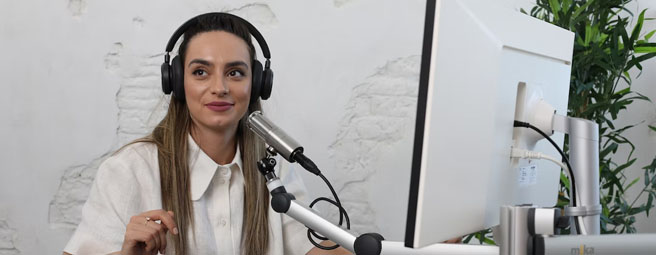
Where to Record a Podcast for Your Business
The recording location decision affects everything about your podcast. Audio quality, production efficiency, the professional impression you make on high-profile guests—all of these factors trace back to where you choose to record.
Where to Record a Podcast: Your Strategic Options
For business podcasters, your recording environment does more than provide a place to speak. It signals credibility, eliminates technical barriers, and sets the tone for content that represents your company or establishes thought leadership.
However, finding the right recording space requires strategy. Professional studios offer broadcast-quality audio but require booking and coordination. Home setups provide convenience but demand technical expertise and acoustic treatment. Remote platforms enable distributed interviews but introduce compression and quality trade-offs.
The solution isn’t one-size-fits-all, but it starts with understanding which recording environment matches your content format, production frequency, and business positioning. Davinci Meeting Rooms offer business podcasters premium, on-demand recording spaces without the overhead of permanent office leases or equipment investments. But succeeding with any recording approach means understanding the advantages and limitations of each option, then making strategic decisions based on your podcast’s specific requirements.
This guide breaks down the specific recording environments that work best for business podcasters: professional studios for maximum quality and efficiency, home studios for frequent production and scheduling flexibility, and remote platforms for distributed interviews. You’ll learn the equipment requirements that matter, the cost structures you’ll encounter, and the booking timelines or setup processes that keep production moving forward.
Why Your Recording Location Matters for Business Podcasts
When a listener presses play on your podcast, they form immediate judgments about production quality. Amateur audio quality—echo, background noise, inconsistent volume—signals that you cut corners. Professional production demonstrates you’re serious about delivering value.
The recording environment determines audio quality at the source level. Record in a room with poor acoustics, and no amount of post-production editing fixes the fundamental problem. Beyond audio quality, the location affects production efficiency. For business owners, production time represents opportunity cost. Every hour troubleshooting equipment is an hour not running your business.
The space also influences guest comfort. When booking industry leaders for interviews, a professional studio signals you have infrastructure to support quality content. For video podcasts, this becomes even more critical—lighting, background composition, and camera setup are elements professional studios optimize, and home setups struggle to replicate.
Where to Record a Podcast: Professional Studio Options
Professional podcast studios eliminate technical barriers between you and broadcast-quality content. These spaces are purpose-built for audio and video recording, with acoustic treatment, premium equipment, and support infrastructure that handles technical details while you focus on content.
Why Professional Studios Deliver Superior Results
Professional studios solve problems most podcasters don’t anticipate. Acoustics are controlled through specialized wall treatments and sound-masking features that eliminate echo and outside noise. Soundproofing blocks traffic noise, HVAC hum, and neighbor activity—all the ambient sounds that plague home recordings. For video podcasts, professional lighting systems and camera configurations deliver cinematic production value.
The time efficiency matters for busy executives. You don’t spend weekends researching equipment or debugging audio interfaces. You book time, show up, record, and return to your business operations.
Davinci Meeting Rooms: The Strategic Choice for Business Podcasters
Davinci Meeting Rooms address the need for premium recording space, but you don’t need it every day. Leasing permanent office space creates overhead that doesn’t match most podcast production schedules.
With over 20,000 locations globally, Davinci maintains presence in major business centers—Los Angeles, Beverly Hills, Irvine, Portland, Austin, Miami, and other key markets. Davinci also covers the next tier of locations such as Bozeman, Fort Collins, Asheville, Columbus, Chattanooga, and more. This coverage matters when booking high-profile guests who expect professional recording facilities in convenient locations.
The technology infrastructure is business-grade: high-speed internet, professional audio and video equipment, LCD projectors and monitors, flexible room configurations. Select locations, including the Sepulveda Business Center in Los Angeles, feature dedicated podcast rooms designed specifically for audio recording.
The ecosystem extends beyond recording space. On-site receptionists greet guests professionally. Secretarial and concierge services handle administrative support. Optional catering supports extended sessions. This infrastructure allows complete focus on content creation rather than logistics.
Consider the scenario. You’re recording an interview with a CEO. They arrive, receive professional greeting at reception, get offered refreshments, and proceed to a polished recording space. The professional impression matters for guest relations and content credibility.
Pricing runs $7 to $65 per hour depending on location and room configuration. For weekly hour-long episodes, this translates to approximately $28 to $260 monthly. Compare this to mid-range home studio equipment costs of $150 to $600 upfront, plus time investment in setup and maintenance.
The flexibility delivers strategic value. You book exactly what you need, when you need it. No long-term commitments. No capital in depreciating equipment. No technical expertise required.
When Professional Studios Make Strategic Sense
Professional studios deliver strongest value when brand credibility drives your podcast strategy. If you’re producing content representing your company or attracting high-level guests, amateur audio quality undermines your message.
Time efficiency becomes critical for business owners with limited availability. Professional studios maximize productive recording time by eliminating technical friction. For podcasters lacking technical expertise, the value proposition simplifies to results versus complexity.
Where to Record a Podcast: Home Studio Considerations
Home studios offer maximum scheduling flexibility and unlimited recording time. For podcasters who produce content frequently and possess technical aptitude, this option provides control without recurring rental fees.
Home Studio Approach
A functional home podcast studio requires thoughtful space selection and acoustic treatment. Select a relatively small room to minimize echo. Prioritize spaces with soft surfaces—carpets, curtains, upholstered furniture—that absorb sound reflections. Closets often work well because hanging clothes act as effective sound dampeners. Avoid perfectly square rooms, which create standing waves that produce uneven acoustics.
Controlling the acoustic environment requires addressing doors, windows, walls, and air gaps. Background sounds from household activity, neighbors, traffic, and HVAC systems interrupt recordings frequently.
Essential Equipment and Cost Structure
A mid-range home studio setup requires $150 to $600 in equipment investment. The microphone represents the primary quality determinant. The Shure SM7B delivers professional performance at $439. The Samson Q2U provides solid budget performance at $100.
XLR microphones require an audio interface. The Focusrite Scarlett 2i2 at $219 serves as the standard recommendation. It converts analog signals to digital, provides phantom power, and offers precise gain control.
Additional requirements include closed-back studio headphones ($30 to $300), boom arm or stand ($30 to $100), pop filter ($10 to $30), and acoustic treatment panels ($50 to $200). Recording software ranges from free options (Audacity, GarageBand) to professional subscriptions (Adobe Audition at $22.99/month, Descript at $12 to $24 per month).
Challenges for Business Podcasters
The primary challenges involve time investment and technical knowledge. Setting up a home studio requires learning equipment operation, troubleshooting issues, and handling audio editing. Most new podcasters find this overwhelming while managing business operations.
Environmental noise control proves difficult. You cannot eliminate neighbor activity, HVAC cycling, or household interruptions during recording. For business podcasters, inviting guests to your home office might not align with your brand positioning.
Where to Record a Podcast: Remote Recording Solutions
Remote recording platforms enable high-quality recordings with geographically dispersed participants. This capability matters for interview-format shows where guests cannot attend in-person sessions.
When Remote Recording Makes Strategic Sense
Geographic distribution represents the primary use case. Remote recording makes interviews possible without travel costs or scheduling complexity. Interview formats benefit most—if your podcast focuses on conversations rather than solo commentary, remote platforms provide unlimited geographic reach for guest booking.
Leading Remote Recording Platforms
Riverside.fm leads through local recording technology. Audio and video capture directly on each participant’s device at full quality (48kHz audio, 4K video), then upload afterward. This eliminates compression and quality degradation from traditional video conferencing platforms. Internet issues don’t destroy recordings—only live monitoring is affected.
Other platforms include SquadCast (automatic backups), Zencastr (automatic mixing), and Cleanfeed (browser-based with audio repair). Pricing typically runs $15 to $40 monthly for professional tiers.
Prioritize platforms that record locally rather than streaming to cloud during capture. Multi-track recording is essential—you need separate audio tracks for each participant for editing flexibility.
Critical Questions Answered for Business Podcasters
The following questions represent the most common concerns business podcasters face when selecting recording locations and planning production workflows.
Podcast Startup Costs and Budget Planning
Startup costs range from $0 to several thousand depending on your recording approach and quality standards.
|
Setup Type |
Upfront Cost |
Monthly Cost |
What’s Included |
Best For |
|
Budget Setup |
$0-150 |
$15 |
Smartphone or computer microphone, free software (Audacity/GarageBridge), basic hosting |
Testing viability with noticeably amateur audio quality |
|
Mid-Range Setup |
$150-600 |
$15-20 |
Quality microphone ($100-300), audio interface for XLR mics ($50-200), headphones ($50-150), paid hosting, acoustic treatment ($50-100) |
Professional-quality audio suitable for business content |
|
Professional Studio Rental |
$0 |
$28-260 |
Davinci Meeting Rooms ($7-65/hour depending on location) |
Weekly hour-long episodes with no equipment investment |
|
Business Setup |
$785 |
$360 |
High-quality equipment, hosting, software, production services |
Professional operations with comprehensive production support |
|
Ongoing Costs (All Setups) |
-- |
$5-50+ |
Hosting ($5-50/month based on downloads), editing if outsourced ($50-500/episode), optional: cover art ($195 one-time), music licensing ($170 one-time), transcription ($25/month) |
Additional costs that apply to all podcast setups |
[Podcast Recording Setup: Cost Comparison]
The calculation centers on production frequency and priorities. Weekly episodes make home studios cost-effective. Monthly episodes favor studio rental. Prioritizing professionalism makes studios optimal regardless of frequency.
Audio Interface Requirements for Podcast Recording
Audio interface requirements depend on microphone selection. USB microphones contain built-in analog-to-digital converters and connect directly to your computer without separate interfaces. Popular USB mics like the Samson Q2U, Audio-Technica ATR2100x, or Blue Yeti work effectively for beginners.
XLR microphones—the professional standard—require an audio interface. XLR microphones capture superior audio quality with better dynamic range and lower noise. They output analog signals requiring conversion to digital. The interface performs this conversion while providing phantom power and precise gain control.
Recommended interfaces include the Focusrite Scarlett 2i2 (2 inputs, $219), Focusrite Vocaster Two (podcast-specific, $249), and RØDEcaster Duo or Pro II (all-in-one stations, $499 to $1,180). Professional studios eliminate this decision entirely. All interfaces and signal routing are provided and professionally configured.
Recording Podcasts with Zoom or Microsoft Teams
While technically possible, recording professional business podcasts through Zoom or Microsoft Teams presents significant quality limitations compared to dedicated recording solutions or professional meeting rooms.
These platforms were engineered for communications, not content production. Both apply significant audio compression to reduce bandwidth, resulting in compressed frequency ranges and artifacts. Comparison testing shows Zoom’s audio quality stops at 12,000 Hz versus 24,000 Hz for local recordings using professional software.
Zoom’s High Fidelity mode (48kHz, up to 192kbps) and Teams’ Music Mode (32kHz, 128kbps) improve over defaults but still fall short. The platforms become more viable if you enable Original Sound (Zoom) or Music Mode (Teams), record separate tracks for each participant, ensure external microphones (not laptop mics), use wired headphones, and maintain wired internet.
These platforms serve casual conversational content where convenience outweighs quality concerns. For business podcasts where brand credibility drives strategy, the audio quality difference becomes noticeable. Listeners perceive lower production quality as less professional, affecting how they value content and expertise.
Optimal Podcast Episode Length
Industry data shows most podcast episodes run 20 to 60 minutes, with averages around 37 minutes. However, optimal length aligns with content format and value proposition rather than arbitrary targets.
Initial episodes perform best at 20 to 40 minutes of content that delivers on the show’s core promise. This duration balances depth with listener attention span. Many successful podcasters launch with three episodes simultaneously to give subscribers immediate content and establish the show’s rhythm.
Content value should dictate episode length. Twenty minutes of substantive content serves audiences effectively without artificial extension. Conversely, formats requiring 60 to 90 minutes for in-depth interviews justify longer durations when content warrants it.
Research indicates listener preference for podcasts over 15 minutes and under 60 minutes, though successful shows exist at both extremes. Consistency matters most—establishing typical episode length within a 10-minute range allows listeners to develop accurate expectations.
Strategic Selection Framework for Business Podcasters
Your recording location should align with your podcast’s strategic positioning and resource allocation.
Choose professional studio recording when:
• Audio or video quality directly impacts your brand credibility
• You’re producing business content for professional audiences
• Recording time is limited and efficiency matters
• You lack technical expertise for equipment management
• You need impressive spaces for high-profile guests
•You want predictable, hassle-free production
Choose home studio recording when:
• You record multiple episodes weekly and can justify equipment costs
• You have technical aptitude for equipment setup and troubleshooting
• Scheduling flexibility and unlimited recording time are priorities
• You’ve secured a suitable quiet space with controllable acoustics
• Upfront investment is preferable to ongoing rental costs
Choose remote recording platforms when:
• Guests are geographically distributed
• Interview format is your primary content structure
• Scheduling in-person sessions proves logistically challenging
• You need separate track recording for editing flexibility
For most business podcasters—particularly those launching new shows or producing professional content representing their company—Davinci Meeting Rooms offer the clearest path to consistent professional-quality production. Professional-grade facilities, comprehensive support services, widespread location availability with dedicated podcast rooms at select sites, and flexible hourly booking eliminate equipment challenges and capital investment that derail many podcast projects.
The pricing is competitive with home studio equipment costs while dramatically exceeding the convenience of DIY acoustic treatment. You position yourself for immediate professional-quality production without the technical learning curve.
Your recording location decision sets the foundation for everything that follows. The right environment supports your content goals, reinforces your brand positioning, and allows you to focus on what matters most—creating valuable content for your audience. Strategic selection based on your specific production needs, guest requirements, and business objectives positions your podcast for sustainable growth and professional credibility.
Frequently Asked Questions (FAQs)
Q1: What is the best recording location for a business podcast?
A1: The best recording location depends on your production frequency, technical expertise, and business positioning. Professional studios like Davinci Meeting Rooms offer the most reliable path to broadcast-quality audio without requiring equipment investment or technical knowledge. For podcasters who record frequently and possess technical aptitude, home studios provide scheduling flexibility and control over the recording environment.
Q2: What equipment do I need to start recording a podcast?
A2: Basic podcast recording requires a quality microphone, headphones for monitoring, and recording software. If using professional XLR microphones, you’ll also need an audio interface to convert analog signals to digital format. Professional studios eliminate equipment decisions entirely by providing all necessary gear already configured and ready to use.
Q3: How do professional studios compare to recording at home?
A3: Professional studios provide acoustically treated environments, premium equipment, and support staff that handle technical details, delivering broadcast-quality results without requiring technical expertise. Home studios offer unlimited recording time and scheduling flexibility but demand upfront equipment investment, technical knowledge for setup and troubleshooting, and manual acoustic treatment to control sound quality. The choice depends on whether you prioritize convenience and professional quality or scheduling flexibility and long-term cost efficiency.
Q4: Can I use video conferencing platforms like Zoom to record my podcast?
A4: While technically possible, video conferencing platforms apply significant audio compression designed for efficient communication rather than content production. Professional recording software or dedicated studio spaces deliver superior audio quality that listeners perceive as more credible and professional. These platforms work best for casual conversational content where convenience outweigh quality concerns rather than business podcasts where brand credibility matters.
Q5: What factors should I consider when choosing where to record my podcast?
A5: Consider your production frequency, available budget, technical expertise, and brand positioning requirements. Evaluate whether you need to accommodate distributed guests, the importance of professional impression on high-profile interview subjects, and how much time you can dedicate to equipment management versus content creation. Your recording location should align with your podcast’s strategic goals and resource allocation rather than being selected based solely on cost.
Related Resources
How to Interview Someone for a Podcast Remotely
https://www.davincimeetingrooms.com/blog/how-to-interview-someone-for-a-podcast-remotely
20 Work From Home Essentials to Make Work Easier
https://www.davincimeetingrooms.com/blog/work-from-home-essentials-to-make-work-easier
Do You Make These Mistakes When Selecting a Meeting Space?
Setting Up a Conference Room for Video Conferencing: What to Know
https://www.davincimeetingrooms.com/blog/setting-up-a-conference-room-for-video-conferencing


Categories
Subscribe to Our Blog
Archive

Talk to an expert
Want help finding the ideal meeting room? Give us a call
Book the Perfect Meeting Room Now
Find a Meeting RoomServices
Meeting Spaces Coworking US Meeting Spaces International Meeting Spaces International Coworking Spaces US Coworking Spaces About our Workspaces About our Services Meeting Space Rates Meeting Rooms Near MeCUSTOMER CARE
Login Sign Up FAQ Infographics Videos Contact us Chat with us Privacy Policy Cookie Policy Terms of Service Health & Safety